

Sending data over HTTP
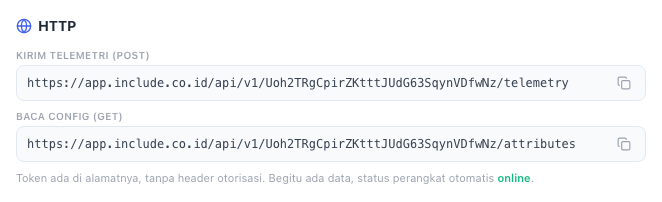
One POST per reading. The device token is in the address, so no authorisation header is needed.
POST https://app.include.co.id/api/v1/YOUR_DEVICE_TOKEN/telemetry
Content-Type: application/json
Replace YOUR_DEVICE_TOKEN with the Device Token from the Koneksi & Integrasi screen. The full address can be copied from that screen as well.
Complete programs in every language are in Code examples.
The request body
A JSON object. Every key becomes one device parameter.
{ "temperature": 25.4, "humidity": 61 }- Values may be numbers, text, or
true/false. Anything else (objects, lists,null) is ignored. - At most 100 parameters per request, and at most 32 KB.
- Unquoted keys are accepted too:
{temperature:25}. Handy when typing in Windows cmd. - Key names are free, but keep them the same from reading to reading:
temperatureandTemperatureare two different parameters.
Reading time
Without a time, the reading is recorded when it arrives. To send your own time, for example for readings held back while the network was down, add ts in Unix milliseconds (UTC) and put the values under values:
{ "ts": 1761980400000, "values": { "temperature": 25.4 } }Token in a header
If the token must not appear in the address, for example because addresses end up in proxy logs, send to a fixed address with the token in a header:
curl -X POST https://app.include.co.id/api/v1/device/telemetry \
  -H "X-Device-Token: YOUR_DEVICE_TOKEN" \
  -H "Content-Type: application/json" \
  -d '{"temperature": 25.4}'
Authorization: Bearer YOUR_DEVICE_TOKEN is accepted too.
Reading settings from the server
Values you enter under Config Server → Device on the Koneksi & Integrasi screen, for example setpoint = 25, can be read by the device:
GET https://app.include.co.id/api/v1/YOUR_DEVICE_TOKEN/attributesThe answer is a JSON object, every value as text:
{ "setpoint": "25", "interval": "30" }Only some keys: add ?keys=setpoint,interval.
MQTT settings for a device
A device that only knows its token can fetch everything it needs for MQTT:
GET https://app.include.co.id/api/v1/YOUR_DEVICE_TOKEN/mqtt-config{
"deviceId": "fCYit_6N7CLa0Uw5NYi_V",
"name": "Warehouse sensor",
"label": "",
"groupId": "ruang_kerja_rina",
"customerId": "ruang_kerja_rina",
"solutionSlug": "custom",
"mqttHost": "app.include.co.id",
"mqttPort": 8883,
"mqttPortPlain": 1883,
"mqttPortTls": 8883
}mqttPortPlain (1883, no TLS) and mqttPortTls (8883) are the two port choices. mqttPort is always 8883, for IncludeBox firmware that reads it. Its telemetry topic is includeapps/{groupId}/{solutionSlug}/{deviceId}/telemetry. See Sending data over MQTT.
Server responses
| Code | Meaning |
|---|---|
202 | Accepted: {"ok":true}. The device status becomes online. |
400 | Not JSON, no usable value, or more than 100 parameters. |
401 | Wrong or missing token. |
409 | The device is not registered to any Organisation. |
429 | Too often. Send less frequently. |
503 | The reading could not be stored. Send it again a few seconds later. |
An error says why:
{ "error": "RATE_LIMITED", "message": "Terlalu banyak pesan; kurangi frekuensi kirim device" }Limits
Every device may send at least 20 messages per second. A plan with a larger data-per-second quota raises that limit to match. See Plans, quotas and trials.
One reading every 10 to 60 seconds suits almost every sensor, and saves quota and battery.