

Connecting an IncludeBox
IncludeBox is Include's own device. Every unit has a QR code and a Device ID on its body, for example IBX-EM-1P-2607-0001.
Steps
Power the device on.
In the app, open Devices, then Add Device.
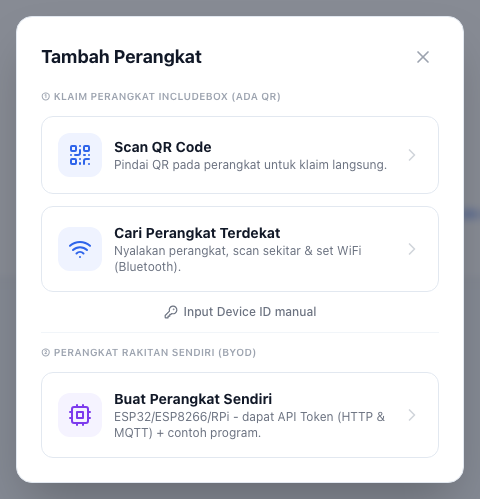
Choose one:
- Scan QR Code: point the camera at the QR on the device. It joins your Organisation at once.
- Cari Perangkat Terdekat (find nearby devices): over Bluetooth. Use this when the device's WiFi is not set yet.
- Input Device ID manual: type the Device ID printed on the device, when the camera cannot be used.
The device appears in the Devices list. Open it to see its data. Every IncludeBox type comes with its own built-in view.
If it fails
- Device ID not found: check the characters again. Zero and the letter O are often swapped.
- Device already registered to another Organisation: contact us on WhatsApp with the Device ID.
- Device registered but no data: see No data arriving.