

Sending data over MQTT
One connection that stays open, for sending readings and receiving commands. Every value below is also on your device's Koneksi & Integrasi screen. Copy it from there to avoid typos.
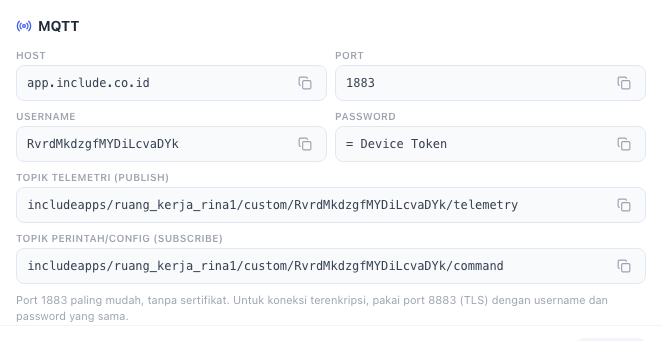
Complete programs in every language are in Code examples, for port 1883 and 8883.
Connection
| Setting | Value |
|---|---|
| Host | app.include.co.id |
| Port | 1883 (no TLS, the easiest) or 8883 (with TLS) |
| Client ID | The device ID |
| Username | The device ID |
| Password | Device Token |
| Version | MQTT 3.1.1 or 5 |
Both ports are open, and both refuse a device with a wrong username or password. Choose what suits your device:
- 1883: no certificate, no clock, light for small boards. Every example in these docs uses this port. The token travels unencrypted, so anyone who can listen on the device's network can read it.
- 8883: the connection and the token are encrypted with TLS 1.2. The server certificate is from Let's Encrypt. Boards that check the certificate themselves (ESP32, ESP8266) need the ISRG Root X1 and X2 root certificates; both are already in the TLS examples. Choose this when the device uses a network you do not control.
Also:
- Use the device ID as the Client ID. Two connections with the same Client ID push each other out: the old one is disconnected when the new one arrives.
- A device that only knows its token can fetch its ID, topic, host and ports with
GET /api/v1/YOUR_DEVICE_TOKEN/mqtt-config. See Sending data over HTTP.
Topics
| Direction | Topic |
|---|---|
| Send readings | includeapps/YOUR_ORG_ID/YOUR_SOLUTION_SLUG/YOUR_DEVICE_ID/telemetry |
| Receive commands | includeapps/YOUR_ORG_ID/YOUR_SOLUTION_SLUG/YOUR_DEVICE_ID/command |
Your device's full topics are on the Koneksi & Integrasi screen as Topik telemetri (publish) and Topik perintah/config (subscribe).
A device may only use topics that contain its own ID. Publishing or subscribing to any other topic disconnects it at once.
Message body
Same as HTTP: a JSON object, one key per parameter.
{ "temperature": 25.4, "humidity": 61 }With your own time (Unix milliseconds, UTC):
{ "ts": 1761980400000, "values": { "temperature": 25.4 } }QoS 0 and 1 are accepted. Use QoS 1 when every reading must arrive.
Receiving commands
Subscribe to the command topic. Every command looks like:
{ "method": "setAttribute", "params": { "setpoint": "25" }, "ts": 1761980400000 }method | Sent when |
|---|---|
setAttribute | A value under Config Server → Device is set or changed. params holds the key and value. |
deviceUpdated | The device's name or label is changed. params holds name and label. |
| others | A control button on a dashboard or an automation rule. params holds key and value. |
A complete Python program that waits for commands and prints them. It is tested too: the platform changes one value under Config Server → Device, and the program must print command: setAttribute {'setpoint': '25'}.
import json

import paho.mqtt.client as mqtt

HOST = "app.include.co.id"
PORT = 1883
DEVICE_ID = "YOUR_DEVICE_ID"
DEVICE_TOKEN = "YOUR_DEVICE_TOKEN"
COMMAND_TOPIC = "includeapps/YOUR_ORG_ID/YOUR_SOLUTION_SLUG/YOUR_DEVICE_ID/command"


def on_connect(client, userdata, flags, reason_code, properties):
    print("connected:", reason_code)
    client.subscribe(COMMAND_TOPIC, qos=1)


def on_message(client, userdata, msg):
    command = json.loads(msg.payload)
    print("command:", command["method"], command["params"])
    # Act on it here, for example switch a relay when a parameter changes.


client = mqtt.Client(mqtt.CallbackAPIVersion.VERSION2, client_id=DEVICE_ID)
client.username_pw_set(DEVICE_ID, DEVICE_TOKEN)
client.on_connect = on_connect
client.on_message = on_message
client.connect(HOST, PORT)
client.loop_forever()
One device may send readings and receive commands over the same connection: add subscribe and on_message to the Python MQTT example.
Trying it from a terminal
With mosquitto_pub from the mosquitto-clients package, over port 1883:
mosquitto_pub -h app.include.co.id -p 1883 \
  -i YOUR_DEVICE_ID -u YOUR_DEVICE_ID -P YOUR_DEVICE_TOKEN \
  -t includeapps/YOUR_ORG_ID/YOUR_SOLUTION_SLUG/YOUR_DEVICE_ID/telemetry \
  -m '{"temperature": 25.4, "humidity": 61}'
Over port 8883 with TLS:
mosquitto_pub -h app.include.co.id -p 8883 --capath /etc/ssl/certs \
  -i YOUR_DEVICE_ID -u YOUR_DEVICE_ID -P YOUR_DEVICE_TOKEN \
  -t includeapps/YOUR_ORG_ID/YOUR_SOLUTION_SLUG/YOUR_DEVICE_ID/telemetry \
  -m '{"temperature": 25.4, "humidity": 61}'
On macOS, replace --capath /etc/ssl/certs with --cafile /etc/ssl/cert.pem.
Network
Port 1883 or 8883 must be open outbound from the device's network. Some office and mobile networks only open 80 and 443. If the device cannot connect but HTTP works from the same network, use HTTP.