

Computers, servers and gateways
Send data from a program on Linux, macOS or Windows: a Modbus gateway, a PC next to a PLC, a server reading another database, or a test script. Examples are in Python, JavaScript (Node.js), Go and C.
The Raspberry Pi has its own guide, which also shows how to start the program automatically: Raspberry Pi.
Get the code
- Open your device, the Pengaturan (settings) tab, then Koneksi & Integrasi.
- In Code examples, choose HTTP or MQTT, then the language tab.
- Press Copy. The device's token and IDs are already filled in.
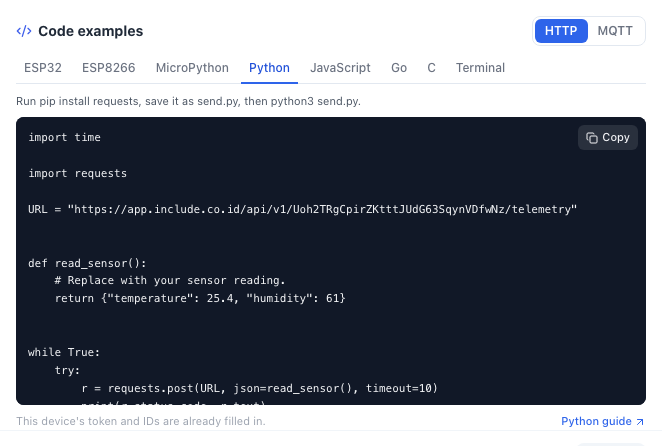
HTTP is easier to start with. MQTT uses less when you send every few seconds, and can receive commands from the platform. The MQTT examples on this page use port 1883; the TLS version (port 8883) of each language is in Code examples. The difference is explained in Sending data over MQTT.
Python
Python 3.8 or newer.
pip install requests      # HTTP
pip install paho-mqtt # MQTTimport time
import requests
URL = "https://app.include.co.id/api/v1/YOUR_DEVICE_TOKEN/telemetry"
def read_sensor():
# Replace with your sensor reading.
return {"temperature": 25.4, "humidity": 61}
while True:
try:
r = requests.post(URL, json=read_sensor(), timeout=10)
print(r.status_code, r.text)
except requests.RequestException as e:
print("send failed:", e)
time.sleep(10)import json
import time
import paho.mqtt.client as mqtt
HOST = "app.include.co.id"
PORT = 1883
DEVICE_ID = "YOUR_DEVICE_ID"
DEVICE_TOKEN = "YOUR_DEVICE_TOKEN"
TOPIC = "includeapps/YOUR_ORG_ID/YOUR_SOLUTION_SLUG/YOUR_DEVICE_ID/telemetry"
def read_sensor():
# Replace with your sensor reading.
return {"temperature": 25.4, "humidity": 61}
def on_connect(client, userdata, flags, reason_code, properties):
print("connected:", reason_code)
client = mqtt.Client(mqtt.CallbackAPIVersion.VERSION2, client_id=DEVICE_ID)
client.username_pw_set(DEVICE_ID, DEVICE_TOKEN)
client.on_connect = on_connect
client.connect(HOST, PORT)
client.loop_start()
while True:
info = client.publish(TOPIC, json.dumps(read_sensor()), qos=1)
info.wait_for_publish(timeout=10)
print("sent:", info.is_published())
time.sleep(10)python3 send.pyOn Windows, use py instead of python3.
JavaScript (Node.js)
Node.js 18 or newer. HTTP needs no extra package. MQTT needs the mqtt package:
npm install mqttconst URL = 'https://app.include.co.id/api/v1/YOUR_DEVICE_TOKEN/telemetry';
function readSensor() {
// Replace with your sensor reading.
return { temperature: 25.4, humidity: 61 };
}
async function send() {
try {
const res = await fetch(URL, {
method: 'POST',
headers: { 'Content-Type': 'application/json' },
body: JSON.stringify(readSensor()),
});
console.log(res.status, await res.text());
} catch (err) {
console.error('send failed:', err.message);
}
}
send();
setInterval(send, 10_000);import mqtt from 'mqtt';
const DEVICE_ID = 'YOUR_DEVICE_ID';
const DEVICE_TOKEN = 'YOUR_DEVICE_TOKEN';
const TOPIC = 'includeapps/YOUR_ORG_ID/YOUR_SOLUTION_SLUG/YOUR_DEVICE_ID/telemetry';
function readSensor() {
// Replace with your sensor reading.
return { temperature: 25.4, humidity: 61 };
}
const client = mqtt.connect('mqtt://app.include.co.id:1883', {
clientId: DEVICE_ID,
username: DEVICE_ID,
password: DEVICE_TOKEN,
});
client.on('connect', () => {
console.log('connected');
const send = () =>
client.publish(TOPIC, JSON.stringify(readSensor()), { qos: 1 }, err =>
console.log(err ? `send failed: ${err.message}` : 'sent')
);
send();
setInterval(send, 10_000);
});
client.on('error', err => console.error('mqtt error:', err.message));node send.mjsGo
Go 1.21 or newer. HTTP uses only the standard library. For MQTT:
go mod init sensor
go get github.com/eclipse/paho.mqtt.golangpackage main
import (
"bytes"
"encoding/json"
"fmt"
"io"
"net/http"
"time"
)
const url = "https://app.include.co.id/api/v1/YOUR_DEVICE_TOKEN/telemetry"
func readSensor() map[string]any {
// Replace with your sensor reading.
return map[string]any{"temperature": 25.4, "humidity": 61}
}
func main() {
client := &http.Client{Timeout: 10 * time.Second}
for {
body, _ := json.Marshal(readSensor())
res, err := client.Post(url, "application/json", bytes.NewReader(body))
if err != nil {
fmt.Println("send failed:", err)
} else {
reply, _ := io.ReadAll(res.Body)
res.Body.Close()
fmt.Println(res.StatusCode, string(reply))
}
time.Sleep(10 * time.Second)
}
}package main
import (
"encoding/json"
"fmt"
"time"
mqtt "github.com/eclipse/paho.mqtt.golang"
)
const (
broker = "tcp://app.include.co.id:1883"
deviceID = "YOUR_DEVICE_ID"
deviceToken = "YOUR_DEVICE_TOKEN"
topic = "includeapps/YOUR_ORG_ID/YOUR_SOLUTION_SLUG/YOUR_DEVICE_ID/telemetry"
)
func readSensor() map[string]any {
// Replace with your sensor reading.
return map[string]any{"temperature": 25.4, "humidity": 61}
}
func main() {
opts := mqtt.NewClientOptions().
AddBroker(broker).
SetClientID(deviceID).
SetUsername(deviceID).
SetPassword(deviceToken).
SetAutoReconnect(true)
client := mqtt.NewClient(opts)
if t := client.Connect(); t.Wait() && t.Error() != nil {
panic(t.Error())
}
fmt.Println("connected")
for {
payload, _ := json.Marshal(readSensor())
t := client.Publish(topic, 1, false, payload)
t.Wait()
if t.Error() != nil {
fmt.Println("send failed:", t.Error())
} else {
fmt.Println("sent")
}
time.Sleep(10 * time.Second)
}
}go run main.goTo install it on a gateway, build one program file: GOOS=linux GOARCH=arm64 go build -o sensor, then copy sensor to the gateway.
C
For Linux, including the Raspberry Pi and Debian-based gateways. HTTP uses libcurl, MQTT uses libmosquitto:
sudo apt install libcurl4-openssl-dev     # HTTP
sudo apt install libmosquitto-dev # MQTT#include <stdio.h>
#include <unistd.h>
#include <curl/curl.h>
#define URL "https://app.include.co.id/api/v1/YOUR_DEVICE_TOKEN/telemetry"
int main(void) {
curl_global_init(CURL_GLOBAL_DEFAULT);
struct curl_slist *headers = curl_slist_append(NULL, "Content-Type: application/json");
for (;;) {
double temperature = 25.4; /* replace with your sensor reading */
double humidity = 61;
char body[128];
snprintf(body, sizeof body, "{\"temperature\": %.1f, \"humidity\": %.0f}", temperature, humidity);
CURL *curl = curl_easy_init();
curl_easy_setopt(curl, CURLOPT_URL, URL);
curl_easy_setopt(curl, CURLOPT_HTTPHEADER, headers);
curl_easy_setopt(curl, CURLOPT_POSTFIELDS, body);
curl_easy_setopt(curl, CURLOPT_TIMEOUT, 10L);
CURLcode rc = curl_easy_perform(curl);
if (rc == CURLE_OK) {
long status = 0;
curl_easy_getinfo(curl, CURLINFO_RESPONSE_CODE, &status);
printf("\nHTTP %ld\n", status);
} else {
fprintf(stderr, "send failed: %s\n", curl_easy_strerror(rc));
}
curl_easy_cleanup(curl);
fflush(stdout);
sleep(10);
}
}#include <stdio.h>
#include <string.h>
#include <unistd.h>
#include <mosquitto.h>
#define HOST "app.include.co.id"
#define PORT 1883
#define DEVICE_ID "YOUR_DEVICE_ID"
#define DEVICE_TOKEN "YOUR_DEVICE_TOKEN"
#define TOPIC "includeapps/YOUR_ORG_ID/YOUR_SOLUTION_SLUG/YOUR_DEVICE_ID/telemetry"
int main(void) {
mosquitto_lib_init();
struct mosquitto *mosq = mosquitto_new(DEVICE_ID, true, NULL);
mosquitto_username_pw_set(mosq, DEVICE_ID, DEVICE_TOKEN);
int rc = mosquitto_connect(mosq, HOST, PORT, 60);
if (rc != MOSQ_ERR_SUCCESS) {
fprintf(stderr, "connect failed: %s\n", mosquitto_strerror(rc));
return 1;
}
mosquitto_loop_start(mosq);
printf("connected\n");
for (;;) {
double temperature = 25.4; /* replace with your sensor reading */
double humidity = 61;
char payload[128];
snprintf(payload, sizeof payload, "{\"temperature\": %.1f, \"humidity\": %.0f}", temperature, humidity);
rc = mosquitto_publish(mosq, NULL, TOPIC, (int)strlen(payload), payload, 1, false);
printf(rc == MOSQ_ERR_SUCCESS ? "sent\n" : "send failed\n");
fflush(stdout);
sleep(10);
}
}cc send.c -lcurl -o send && ./send
cc publish.c -lmosquitto -o publish && ./publishThe TLS version of the MQTT example (port 8883) checks the server certificate against the system certificates in /etc/ssl/certs. On macOS, install libmosquitto with brew install mosquitto, then change the mosquitto_tls_set line in that version to:
mosquitto_tls_set(mosq, "/etc/ssl/cert.pem", NULL, NULL, NULL, NULL);What success looks like
| Protocol | On screen |
|---|---|
| HTTP | 202 {"ok":true} every 10 seconds |
| MQTT | connected, then sent every 10 seconds |
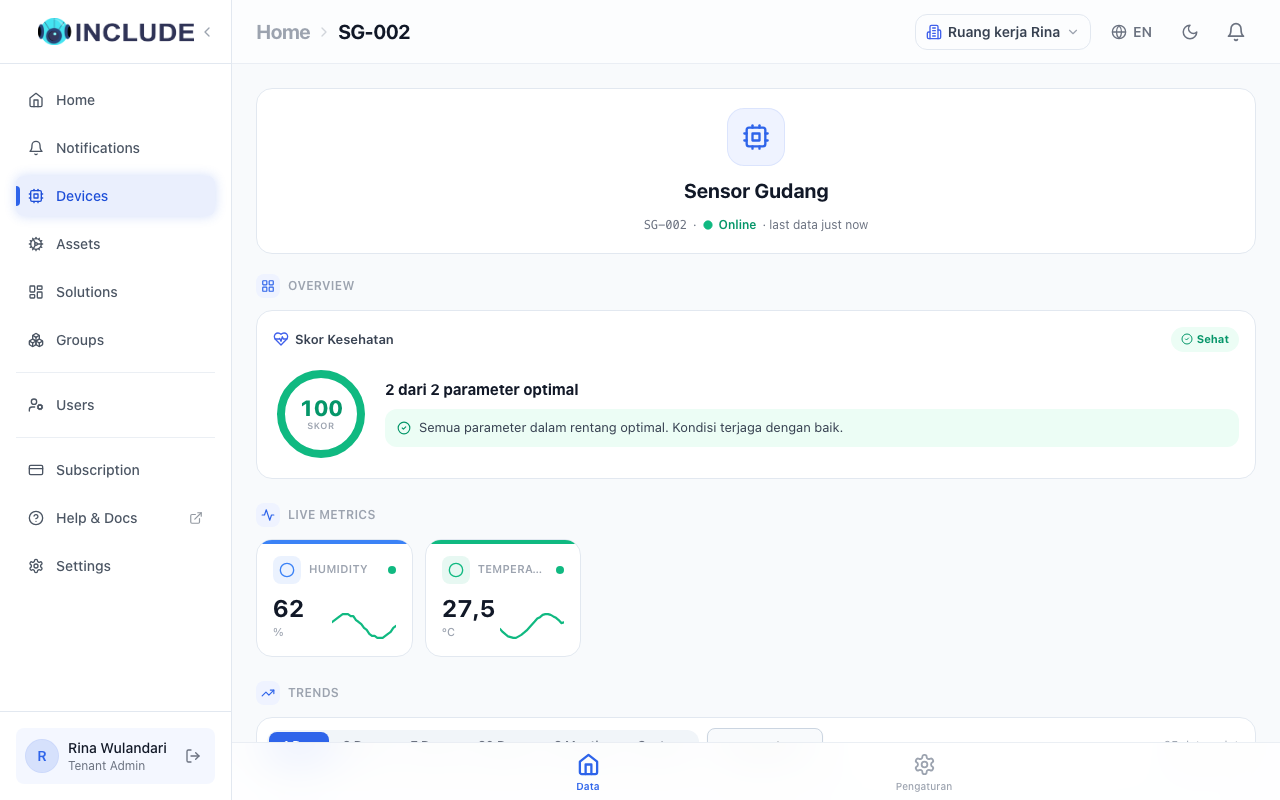
In INCLUDE, the reading shows on the device page a few seconds later.
If it does not work
| Message | Meaning |
|---|---|
401 | Wrong token. Copy it again from Koneksi & Integrasi. |
429 | Sending too often. Make the pause longer. |
certificate verify failed | The computer's certificates are out of date. Update ca-certificates. |
MQTT Not authorized or Bad user name or password | Wrong Device ID or Device Token. |
| MQTT connects, then drops at once | The topic does not belong to this device, or another program uses the same Client ID. |
See also No data arriving.